Trace a click from the browser to the backend
A user clicks Pay and gets an error. Your backend traces start at the API, so you can see a slow or failing request, but you can't tell which click caused it. The browser and the server are two separate stories.
The fix is to start the trace in the browser. The page adds a W3C traceparent header to its own API calls, the backend continues that trace instead of starting a new one, and the waterfall begins where the click did. This post shows how that works with @ziplogger/browser, using output from a real run: the SDK in a small test script calling a real ASP.NET Core API instrumented with OpenTelemetry.
Turn it on in the browser
npm install @ziplogger/browserimport { ZipLoggerBrowser } from '@ziplogger/browser'
export const ziplogger = new ZipLoggerBrowser({
endpoint: 'https://app.ziplogger.ai',
apiKey: 'YOUR_BROWSER_API_KEY', // an ingest-only key; it is visible in the page
source: 'storefront',
})
ziplogger.instrumentFetch({ propagateTo: ['https://api.shop.example.com'] })instrumentFetch() wraps window.fetch. Requests to your own origin are traced by default. That means full URLs on the page's origin and paths that start with /. For an API on another origin, list it in propagateTo. The list holds URL prefixes, so https://api.shop.example.com matches every path under it.
Anything else is left alone. Calls to font hosts, analytics and payment providers go out unchanged, and so do the SDK's own calls to ZipLogger.
What goes over the wire
For each traced request the SDK makes a new trace id and span id and sets two headers. The ids in this post are from the run. The hostnames are swapped for example ones and the JSON is trimmed.
traceparent: 00-fe0ace981f83f5fa076df784f0c2afd0-5e35e01eab813db3-01
baggage: session.id=sess_adaef9ac8b60901ec445
The traceparent value is version 00, the trace id, the browser span's id, and 01 for "sampled". The baggage header carries the visitor's session id, so the backend can record which session a request belonged to. Pass propagateSession: false if you only want the trace id.
When the response comes back, the SDK sends one client span for the request to ZipLogger's /v1/traces, as OTLP/JSON:
{
  "service": "storefront-browser",
  "traceId": "fe0ace981f83f5fa076df784f0c2afd0",
  "spanId": "5e35e01eab813db3",
  "name": "POST /api/checkout",
  "kind": "SPAN_KIND_CLIENT",
  "attributes": [
    { "key": "url.full", "value": { "stringValue": "https://api.shop.example.com/api/checkout" } },
    { "key": "http.request.method", "value": { "stringValue": "POST" } },
    { "key": "session.id", "value": { "stringValue": "sess_adaef9ac8b60901ec445" } },
    { "key": "http.response.status_code", "value": { "intValue": "502" } }
  ],
  "status": { "code": "STATUS_CODE_ERROR", "message": "HTTP 502" }
}
The service name defaults to your source plus -browser. Change it with the serviceName option. Any status of 400 or above, or a network failure, marks the span as an error.
The failed request is also logged, with the trace id in its fields:
{
  "severity": "error",
  "message": "POST https://api.shop.example.com/api/checkout failed with HTTP 502",
  "fields": {
    "traceId": "fe0ace981f83f5fa076df784f0c2afd0",
    "spanId": "5e35e01eab813db3",
    "httpStatus": 502,
    "requestUrl": "https://api.shop.example.com/api/checkout"
  }
}
A 5xx response is logged as error and a 4xx as warn. Turn this off with logFailures: false. To keep the header but not send browser spans, use sendSpans: false.
The backend: continue the trace
ZipLogger's logging SDKs do not create spans. Backend spans come from OpenTelemetry, and every OpenTelemetry SDK reads traceparent by default. So the backend only needs normal OpenTelemetry tracing pointed at ZipLogger. This is the ASP.NET Core API from the run:
using OpenTelemetry.Resources;
using OpenTelemetry.Trace;
using ZipLogger.Extensions.Logging;
using ZipLogger.Metrics.AspNetCore;

var builder = WebApplication.CreateBuilder(args);

builder.Logging.AddZipLogger(o =>
{
    o.Endpoint = "https://app.ziplogger.ai";
    o.ApiKey = "YOUR_API_KEY";
});
builder.Services.AddZipLoggerMetrics(o =>
{
    o.Endpoint = "https://app.ziplogger.ai";
    o.ApiKey = "YOUR_API_KEY";
    o.Service = "shop-api";
});

builder.Services.AddOpenTelemetry()
    .ConfigureResource(r => r.AddService("shop-api"))
    .WithTracing(t => t
        .AddAspNetCoreInstrumentation(o => o.Filter = ctx => !HttpMethods.IsOptions(ctx.Request.Method))
        .AddOtlpExporter());

builder.Services.AddCors(o => o.AddPolicy("web", p => p
    .WithOrigins("https://shop.example.com")
    .WithMethods("GET", "POST")
    .WithHeaders("content-type", "traceparent", "baggage")));

var app = builder.Build();
app.UseCors("web");
app.UseZipLoggerMetrics();

app.MapPost("/api/checkout", (ILogger<Program> logger) =>
{
    logger.LogError("Payment provider declined order {OrderId}", 1042);
    return Results.StatusCode(502);
});

app.Run();
The exporter reads the standard variables:
OTEL_EXPORTER_OTLP_PROTOCOL=http/protobuf
OTEL_EXPORTER_OTLP_ENDPOINT=https://app.ziplogger.ai
OTEL_EXPORTER_OTLP_HEADERS=X-Api-Key=YOUR_API_KEY
The server span that arrived had the browser's trace id, and its parent was the browser span:
{
  "service": "shop-api",
  "traceId": "fe0ace981f83f5fa076df784f0c2afd0",
  "spanId": "be1452ebe5845178",
  "parentSpanId": "5e35e01eab813db3",
  "name": "POST /api/checkout",
  "attributes": { "http.route": "/api/checkout", "http.response.status_code": 502, "session.id": "sess_..." }
}
That parent link is what nests the API under the click in the waterfall. The session.id attribute is there because UseZipLoggerMetrics() copies it from the baggage header onto the request's span. The middleware only runs when it has an endpoint and key, so an unconfigured AddZipLoggerMetrics means no session id either. In other languages you need an OpenTelemetry baggage span processor for the same effect. Without one, the trace still joins up but the backend span has no session id.
The backend's own log line came out with the same ids, because the .NET provider reads the current Activity:
{
  "severity": "error",
  "message": "Payment provider declined order 1042",
  "fields": { "OrderId": 1042, "traceId": "fe0ace981f83f5fa076df784f0c2afd0", "spanId": "be1452ebe5845178" }
}
The .NET packages (ZipLogger.Extensions.Logging and ZipLogger.Serilog) add traceId and spanId for you. The Node, Python, Go, Java, Ruby and PHP SDKs do not. Add the trace id to your log fields yourself, as shown in the traces docs. For more on the server side, see sending OpenTelemetry traces over OTLP.
CORS: allow the two headers
Same-origin requests need no extra setup. Cross-origin requests do. Adding traceparent to a request makes the browser send a preflight OPTIONS request first, and the real request only goes out if the server allows the header.
The API above answers the preflight like this:
HTTP/1.1 204 No Content
Access-Control-Allow-Origin: https://shop.example.com
Access-Control-Allow-Headers: content-type,traceparent,baggage
Allow both traceparent and baggage. If you allow only traceparent, the browser blocks the request anyway, because baggage is also sent. Add an origin to propagateTo only after its CORS config is live. Otherwise you break the requests you were trying to trace.
The preflight has no traceparent of its own, so an instrumented backend records each one as a separate one-span trace called OPTIONS. In the run, every preflight showed up this way. The Filter in the sample above drops them.
What you see in ZipLogger
The Traces page lists one row per trace: Root span, Service, Started, Duration and Spans, with an ok or error badge. You can filter by service and time range, or tick errors only. Open a row to see the waterfall. The browser span sits at the top, the API spans are nested under it, each service has its own color, and error spans are red. Click a span for its attributes, then Investigate this span or Investigate the whole trace to see its logs and events on one page.
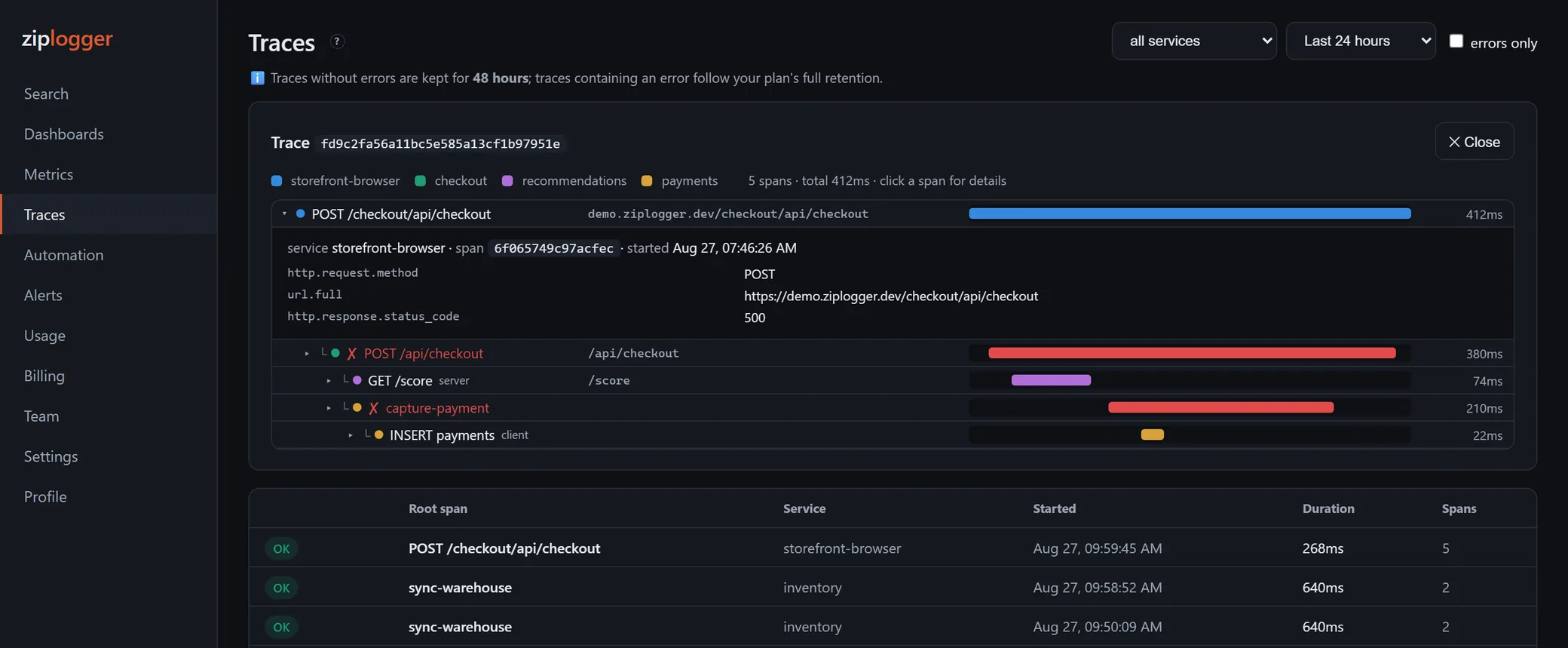
This screenshot is from demo data and an earlier version of the page. The retention note above the list has changed since.
You can also start from the error. On Search, expand the failed-request log line and click View trace (full request waterfall). It opens the trace with the browser span highlighted.
Limits
fetchonly.XMLHttpRequestis not wrapped. Libraries built on it are not traced, including axios in the browser unless you switch it to its fetch adapter.- Relative paths need a leading slash.
/api/cartis traced.api/cartis not. - One span per request. No page-load, rendering or user-interaction spans. Durations come from
Date.now(), so they are in whole milliseconds. - Browser spans go out on a timer. They are sent every
flushIntervalMs(3 seconds by default), not when the page unloads. If a full page navigation happens before that, the browser span can be lost. The backend spans and the failure log are not affected. - No sampling in the browser. Every traced request is marked sampled. On a busy site,
sendSpans: falsekeeps propagation and failure logs while leaving span volume to your backend's sampler. - Retention. Traces that contain an error keep your plan's full retention. Error-free traces are kept for up to 30 days. See pricing for plan limits.
The option list is in the browser docs. To try it, create a free workspace, add instrumentFetch() to one page, and open Traces after your next API call. Errors that happen before any request are covered in JavaScript and React error tracking.