Features

Everything, in the order you would actually use it

ZipLogger is not a shelf of separate tools. Each part exists to hand the next one an identifier, so an investigation runs from what a user did all the way to the commit behind it. This page follows that path.

  1. User action
  2. Journey
  3. API request
  4. Trace
  5. Error
  6. Pattern
  7. Commit
  8. Root cause
1 · Capture

Get the signal in, with enough context to be joined up later

Everything downstream depends on what arrives. ZipLogger enriches each record with the release, commit SHA, environment and trace id, which is what makes the later steps possible at all.

Patterns

Read ten templates instead of ten thousand lines

What it does. Near-identical log lines are clustered into templates, with the variable parts shown as the diff between them. Each template has a stable hash, a severity mix, first and last seen, and example events.

The problem it solves. An error storm is thousands of rows that all say the same thing. Scrolling them tells you nothing about how many distinct failures you actually have.

How it connects. A pattern is the unit everything else attaches to: attribution runs on a pattern, not a line, and the same pattern is what correlates back to affected users.

Illustrative example
# 4 templates cover 214 events
142,801  Order <*> processed in <*>ms
 98,112  Cache miss for key <*>
    214  NullReference in
         PaymentProcessor.Charge()
      7  Timeout calling <*> after <*>ms
Distributed tracing

Follow one request across every service it touched

What it does. A native OpenTelemetry receiver over HTTP takes your spans and renders them as a waterfall, with a field explorer over every span attribute and keep-only or exclude filters on any value.

Why it matters here. The browser SDK adds a W3C traceparent header to same-origin fetches, so a click in the page and the server call it triggered share one trace id. That single fact is what lets a user-visible failure reach a backend stack trace.

How it connects. Logs carry the trace id, so a trace links to its logs and a log links to its trace. Error traces are kept for your full plan retention.

A distributed trace in ZipLogger shown as a waterfall of spans across services, with one span marked as an error A trace waterfall, with the failing span in context.
APM

See which endpoint got slower, and what it was waiting on

The problem it solves. A trace shows one slow request. It does not tell you whether the endpoint is slow for everyone, since when, or whether the time went to your code, the database or another service.

What it does. APM turns your OpenTelemetry traces into latency (P50, P95, P99), error rate and traffic for every service and endpoint. It lists each dependency a service calls, draws a service map from the calls it actually observed, and splits an endpoint’s time between the calls that were in flight. It compares two releases or two time windows, and it opens a regression when an endpoint’s P95 rises well above its own baseline and stays there. Service-level objectives track availability or latency targets over 7, 28 or 30 days, with the error budget left and burn-rate alerts that page only while the budget is still burning.

Honest about its numbers. Every figure says where it came from. With ZipLogger request metrics you get complete request counts; with traces alone, counts are labeled as observed spans, because sampled traces are not your request total.

How it connects. From a slow endpoint you open its slow, typical and failed traces, their logs, the session replay, the related issues and, when spans carry Kubernetes attributes, the workload and Pod they ran on. A P95 or error-rate alert rule pages through the same on-call routing as every other alert. A slowdown that starts with a deploy is shown as observed alongside that release, not as proof that the release caused it. Set up APM →

Illustrative example
# APM · checkout-api · POST /checkout/{cartId}
Source       Request metrics · Sampled
Latency      P50 · P95 · P99, release 1.5.0 first seen

# Where the time goes (mean per request)
db:postgresql/orders    ███████
inventory-api           ████
Unattributed            ██

Regression   Open · P95 vs its own baseline
             → compare 1.5.0 with 1.4.0
Metrics

Chart and alert on any metric you send

What it does. The Metrics page charts any metric: OpenTelemetry metrics such as host CPU and memory from the Collector, counts and values a log pipeline extracts from your logs, and ASP.NET Core request durations. Pick an aggregation (average, sum, p95, p99, rate and more), filter by label and group by host, service or any label. The query lives in the URL, and Add to dashboard turns the chart into a Metric widget.

How it connects. The same names work in metric monitors, with one incident per host or group, and in anomaly monitors that compare a value with the same time on previous days or weeks. Request metrics also give APM complete request counts, so its error rates, percentiles and SLOs do not depend on how much you sample traces.

The ZipLogger metrics screen showing request latency and throughput charts per service Per-service latency and throughput.
Kubernetes monitoring

Know which workload broke, and the reason Kubernetes gave

The problem it solves. When a Deployment stops serving, the answer is usually already in the cluster: a pod waiting on a Secret that does not exist, an image tag that was never pushed, a node out of memory. It is spread across pod states, events and specs, and someone has to put it together with kubectl while users wait.

How it works. Create a collector key under Kubernetes → Install and run one helm install. The chart runs the upstream OpenTelemetry Collector in your cluster: a cluster collector that watches objects and events, and an agent on each node for usage and container logs. Access is read-only (get, list and watch), it cannot read Secrets or ConfigMaps, environment variable values never leave the cluster, and all traffic is outbound HTTPS.

What you get. Every node, namespace, workload and pod, with CPU and memory against limits. Over twenty problem types, from crash loops, image pull errors and missing Secrets to unschedulable pods, stuck rollouts, failed Jobs and nodes that are not ready. Each problem names the workload a person would fix, the pods it affects, the cause when Kubernetes stated one, and the evidence. A timeline puts events, rollouts, problems, error logs and error traces in one order.

How it connects. Built-in monitors turn problems into incidents, one per problem, resolved on their own when the problem clears. Installing the chart does not set up paging: route a monitor to an escalation policy, or connect a PagerDuty or Opsgenie destination, and it pages through the same on-call path as every other alert. If the cluster itself goes quiet, that opens an incident too. Install and permissions →

  1. Your cluster
  2. Read-only collectors
  3. HTTPS out
  4. Problem + cause
  5. Incident
Illustrative example
# Kubernetes · Problems
Missing Secret / ConfigMap (config error)
Deployment   checkout-api · namespace shop
Pods         3 affected (0/3 available)
Reason       CreateContainerConfigError
Cause        Secret "payments-db" was not found.
             Container "api" reads it through env
             DATABASE_PASSWORD.
  → one incident, resolved when the pods start

Continuous profiling

Which functions a service spends CPU, wall time and memory in, as flame graphs per release, compared with a baseline, and linked from a profiled trace. Send profiles from the open-source Pyroscope profilers (Go, Python, Node.js, .NET, Ruby, Rust) or from Sentry SDKs. Use it when APM shows a slower endpoint whose time is unattributed: APM cannot tell CPU from uninstrumented waiting, a profile can. Profiles are kept 14 days. Java JFR and OpenTelemetry profiles are not supported.

Send profiles →

Browser RUM

How fast your site is for real visitors: Core Web Vitals (LCP, INP, CLS, plus FCP and TTFB), page load phases, the API calls each page makes and its slowest assets, as percentiles computed on the server. A slow call links to its backend trace. Turn it on in @ziplogger/browser 0.8.0 or later, after consent, with the sample rate you choose. The numbers describe the sampled, consented page views, not your total traffic.

Turn on RUM →

Database monitoring On request

For PostgreSQL, MySQL and MariaDB: connections against the limit, normalized queries ranked by time, sessions blocked on a lock, query regressions and, where the engine allows, execution plans. You run one OpenTelemetry Collector next to the database with a read-only login. It is built but not switched on for every workspace: ask us to enable it. Other engines are not supported.

How it works →

Infrastructure monitoring

Every host, the processes on it and the containers it runs

The problem it solves. A service is slow and nobody knows whether the box is out of memory, the disk is full, a neighbour is eating the CPU, or a container has been restarting for an hour. The answer is on the host, and it should sit next to the host's logs and traces, not in a second tool.

How it works. Create a host collector key under Infrastructure → Set up and run the bundle on the host: one OpenTelemetry Collector (the upstream contrib build, pinned by digest, configured by ZipLogger) reads CPU, memory, load, disks, filesystems, network, paging, the busiest processes and the Docker containers, and sends them over outbound HTTPS. Docker Compose, a systemd unit with an install script that verifies the release checksum, or Windows. Kubernetes nodes need no bundle: the ZipLogger Helm chart's node agent reports them.

What you get. A hosts list with CPU, memory, disk and load and an hour of sparklines, filtered by tag, OS, cloud or region; a host map coloured by any of them; a host page with twelve charts over the time picker, the top processes (password-like arguments masked), the containers on the host and links to its logs, traces and errors; containers with restarts and history; processes across hosts grouped by command. Seven built-in alerts (a host that stops reporting, a filling disk, memory, CPU, load, a restart loop, a container killed at its memory limit) open incidents through the same on-call routing as everything else, with the measured numbers as evidence. Plans include a number of hosts; containers are free under their host. Install and what leaves the host →

  1. Your hostVM, bare metal or a Kubernetes node
  2. One Collectorupstream OpenTelemetry, pinned, read-only
  3. Outbound HTTPSa queue on the host rides out outages
  4. Hosts, processes, containersinventory, map, charts, history
  5. Incidentsevidence-based, through your on-call
# Infrastructure · Problems
Disk almost full  web-7 (/data)       since 12 min   high
  /data is 93.1% full (threshold 90%).
Container restart loop  web-3/api       since 4 min    high
  Container api restarted 3 times in 15 minutes (threshold 3).
2 · Correlate

Attach the failure to the person who hit it

A count is not a symptom. These three features answer who was affected and what they were trying to do — from the real users who hit it, from the recording of the session itself, and from journeys you replay deliberately.

Product events and journeys

What users were doing when it broke

What it does. Track() and Identify() record product events beside your logs. From there you get an event explorer, funnels in two modes, retention triangles, cohorts, and a session page that is an ordered timeline of one person's journey. Process reports save a multi-step process with a conversion window per person, and list the people at each step, with a link to their session, replay and Investigate. A person whose window is still open counts as pending, not as lost.

The problem it solves. "Checkout failed 214 times" does not tell you which users, what they did first, or where in the funnel they were standing.

How it connects. Open an error pattern and ask what users were doing. ZipLogger matches events to the error by trace id and session, then shows the common journey into it, how many users were affected, and links to individual sessions. That join needs the events and the logs to be in one system, which is the point.

Product analytics in depth →

The ZipLogger event explorer with one event row expanded to show the session, trace, release and commit derived around it An event expanded to the session, trace, release and commit around it.
Session replay All plans

Watch the session that produced the error

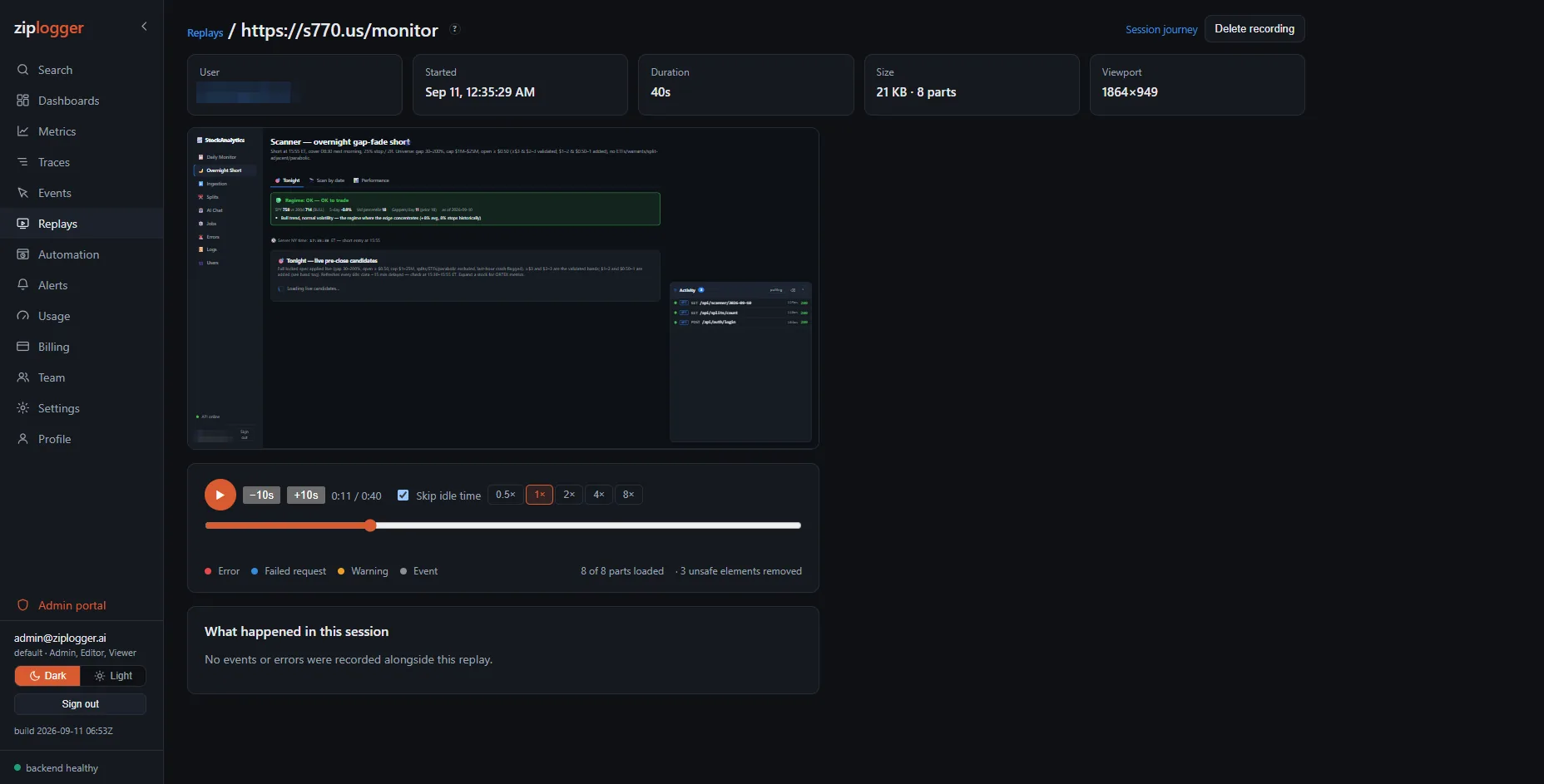
What it does. Records the DOM of a real visit and rebuilds it in the app: the pages the user saw, the cursor, the clicks, the scrolling, the field they retyped four times. Play, pause, seek, 0.5× to 8× speed, and skip the idle stretches. It is a DOM recording, not video, so a session is a few hundred kilobytes and the text in it is selectable text.

The problem it solves. A stack trace tells you what threw. It does not tell you what the person did to get there, and "cannot reproduce" is the most expensive sentence in support.

How it connects. A replay carries the same session id as that visit's events and error logs, so it is one click from the session journey — and the errors, failed requests and tracked events from that session are markers under the player. Click a marker to jump to the moment it happened, then follow its trace id into the backend waterfall.

What it never records. Passwords, one-time codes and payment fields are always masked, whatever the configuration says; every other input is masked by default. Add data-ziplogger-mask to mask an element's text, or data-ziplogger-ignore to leave a whole area out of the recording. Masking happens inside the browser before anything is sent, so the values never reach ZipLogger at all. Cookies, local storage, headers, tokens and URL query strings are never captured.

Which sessions are recorded. Only the ones you choose. Recording is off until your app turns it on in the browser SDK, and a sample rate decides, once per visit, whether that visit is recorded; a visit outside the sample has no replay. If your site needs consent first, start recording only after the visitor gives it, and stop it (discarding what is buffered) if they take it back. A workspace admin can also switch recording off or lower the sample rate centrally. Each plan includes a monthly number of recorded sessions and amount of replay data; once one is used up, new visits are not recorded until the next month, unless a paid workspace opted into overage.

What it costs your page. 2.8 KB gzipped in your bundle, 0.019 ms of extra main-thread time per DOM change, and no long tasks — measured, not estimated. The recorder itself is downloaded only by the visitors you actually sample, and you choose the share.

Set up session replay →

A session replay in ZipLogger: the recorded page rebuilt in a sandboxed player, with play controls, a timeline and speed options underneath, and the session's user, start time, duration and size above A 40-second session played back from an 8-part, 21 KB DOM recording.

At a glance

What is recorded
DOM, not video
Inputs
Masked in the browser
Sampling
Your share, decided per visit
Retention
30 days by default, up to 90
Added to your bundle
2.8 KB gzipped
Cost per DOM change
0.019 ms
Plans
All plans (Free: 100 sessions and 50 MB a month)

A workspace admin can delete any single recording outright, and every replay is rendered in a sandboxed frame with scripting disabled.

Browser automations All plans

Catch a broken sign-in before a customer tells you

What it does. Record a real journey through your app once, in a real browser, from inside ZipLogger. It then replays that journey on a schedule in a real Chromium and keeps the screenshot, the console output, the failed network requests and the timing of every step.

The problem it solves. Logs tell you a request failed. They do not tell you that the sign-in button stopped working, or that checkout breaks on step four for everyone.

How it connects. This is not a separate monitoring product bolted on. The run carries its own trace id, so the same page shows what your application did on the server, the stack trace from the failing span, and the commits that landed since that journey last passed. A failure can open a regression case directly from there.

Every plan includes automations; plans differ in how many you may keep. Private agents let you run journeys against an application that is not reachable from the public internet.

The ZipLogger automation screen listing recorded browser journeys with their recent run results Recorded journeys and their scheduled runs.
3 · Find the cause

The step most stacks leave to a person

Error tracking

Every bug once, with who it hit and whether it came back

The problem it solves. One bug in production is a thousand error lines, one per visitor. What you need to know is how many different bugs there are, which ones are new, how many people each one reaches, and whether the one you fixed last week is back.

What it does. Errors that carry an exception are grouped into Issues, per service and environment, by exception type and the functions in your stack, so a redeploy does not split them. Each Issue shows its occurrences, the users affected, the releases it appeared in and its history. Assign it, resolve it now, in a named release or in the next one, or ignore it for a while. If it happens again in a release that should contain the fix, it reopens as regressed and an alert can tell you once, not once per error.

Readable browser stacks. Upload your build’s source maps from CI with a key that can do nothing else, and minified frames such as index-4f2a91.js:1:48213 read as the original file, line and code. Maps stay private to your workspace and are never fetched from your site.

Release health. Crash-free sessions, crash-free users and adoption for every release, from the ZipLogger browser and .NET SDKs or any Sentry SDK, with an alert when crash-free sessions drop below your target. How it works

Working on it together. Comments on an Issue, in Markdown. Create issue… opens one in GitHub, Jira Cloud or Linear with the title, service, location, counts, first and last seen, releases and a link back, never the error message, stack trace or user data; Link existing… attaches any issue you already have. On the Issues list, tick several and resolve, ignore, reopen, assign or merge them at once. Status does not sync both ways: closing the outside issue does not resolve the ZipLogger Issue. Issue trackers

How it connects. Errors arrive the way they already do: the ZipLogger SDKs, OpenTelemetry logs, or a Sentry SDK with a changed DSN. Every occurrence links to its trace, its logs, the session that produced it and its release, and an Issue starts the suspect-commit and AI steps below.

What it needs, honestly. An error with an exception or stack trace; a plain error line stays a log line. Counting users needs a user id on the error. Source maps are JavaScript only, apply when you view an error, and are not used for commit blame. Read the docs →

Illustrative example
# Issues · web · production · last 14 days
Regressed  TypeError: Cannot read properties
           of undefined (reading 'total')
           412 events · 97 users · web@3f9a2c1
New        RangeError: Invalid time value
           18 events · 11 users · web@3f9a2c1

# Occurrence, with the source map applied
src/checkout.js:42:11  (source map)
  const total = cart.summary.total
  minified: e index-4f2a91.js:1:48213
Git regression attribution

From a stack trace to the commit that most likely caused it

What it does. Connect a GitHub or GitLab repository. ZipLogger parses the file:line frames out of an error's stack trace, calls the provider's blame API for just those files, and ranks the commits most likely responsible with their author, date and the exact blamed lines. The suspect's diff is fetched on demand.

The problem it solves. Your error tracker knows the exception. Your git host knows the history. Neither knows the other, so a person reads both and guesses. This makes that join explicit and repeatable.

How it connects. It runs on a pattern, so you attribute one failure rather than ten thousand lines. A regression case can also be opened straight from a failing browser automation. The result feeds the AI step below.

What it needs, honestly. A stack trace with frames from your own code. Errors logged without an exception, or whose frames are all framework internals, cannot be attributed, and ZipLogger says so instead of guessing. Attribution reads frames as they were received: source maps make minified browser frames readable on the Issue page, but blame still needs frames that name your source files, so it works best on server-side errors. Nothing is ever cloned or stored, the access token is encrypted at rest, and the connection is read-only.

Illustrative example
# Regression case · checkout-api 2.4.1
NullReference in PaymentProcessor.Charge()
  at Charge(Payment.cs:184)
  at HandleAsync(CheckoutHandler.cs:57)

Suspects (ranked):
 1. a3f92c1 refactor currency handling
    dana@acme · touches Payment.cs:180-191
    top suspect
 2. 88d01ce bump payment SDK to 4.2
    lee@acme · earlier · lower rank

AI: Currency can be null when the cart was
created before the deploy. Guard in
PaymentProcessor.Charge() or backfill carts.
AI analysis

Your own model key, reading your own production

What it does. Ask in plain English and get a search. Summarise an error storm in one click. Explain an incident from its timeline. Get a root cause and a suggested fix on a regression case, written against the suspect's actual diff. Explain why a browser journey failed.

How it works, and why that matters. Every AI feature runs on your own Anthropic, OpenAI or Google account. You paste a key, it is verified against the provider, encrypted at rest and never shown again. Nothing is sent to any model until you ask for an analysis, and with no key configured everything else in ZipLogger is unaffected. Nobody is reselling you tokens, and the privacy answer is that your data went to the provider you chose, under your own contract.

AI analysis is included from Pro upward, with a monthly request allowance per plan.

Illustrative example
# Ask in English
> payment errors in the last hour

severity:error AND source:checkout-api
AND message:"payment"

# Summarize errors
Three distinct failures. The largest is a
null currency on carts created before
2.4.1. Two are timeouts to the rate
provider and appear unrelated.
4 · Respond

Incident management and on-call, in the same place as the evidence

PagerDuty and Opsgenie decide whose phone rings. ZipLogger can do that too, and it already knows what broke, who was affected, which request failed and which commit is the likely cause. You do not need a second platform to run an on-call rota.

  1. Detection
  2. Incident
  3. Severity
  4. On-call
  5. Escalation
  6. Acknowledged
  7. Resolved
On-call and escalation

The rota, the escalation and the page

What it does. On-call teams with members and roles. Schedules in your own time zone, with rotations measured in hours, days or weeks, and overrides for the week somebody is away. The team page shows who is on call right now. Rotation layers (primary, secondary, backup) let several rotations of one team run side by side. Escalation policies are ordered steps that target a team, one layer of it, or a named person, each with its own delay, and a policy can repeat up to 9 times until someone acknowledges. Each person can subscribe to their own shifts, or to a whole schedule, in their calendar app.

How a page actually reaches someone. Email, SMS and voice calls. Each responder decides on their own profile whether they are texted, rung, or both. A built-in sender works with no setup and includes a monthly allowance of calls, texts and emails; past that you top up credits, or connect your own provider account and pay their rates instead. Incidents can also post to Slack, Microsoft Teams, Discord or Telegram as one message that is edited as the incident is acknowledged and resolved.

Per-severity notification policies. A critical can ring a phone immediately while a low sends one email, and a policy can hold a channel back for a few minutes so a self-resolving blip never wakes anyone. Acknowledging stops the escalation and records who did it, and the page itself can do it: the Acknowledge button in the email, replying with the code in the text (Reply 4821 to ack.), or pressing 1 during the call. So do the app and a Slack or Teams card. Discord and Telegram messages have no buttons. Follow-the-sun rotations and hours-of-day layers are not available yet: cover a gap with an override.

Quiet by default where it should be. Duplicate alerts fold into the open incident rather than paging twice. Flood control caps how many incidents a workspace can raise per minute. Maintenance windows suppress paging for planned work, and an incident can be suppressed by hand.

After it is over. A resolved incident gets a postmortem: summary, impact window, root cause, contributing factors, resolution, preventive actions, an owner and action items, moving from draft to in review to published. Every save keeps the previous version.

The ZipLogger alerts screen listing alert rules with their conditions, thresholds and notification channels Alert rules and their channels. Incidents, teams, schedules, escalation and notification policies each have their own tab alongside.
Service health checks

Know a service went quiet, not just that it errored

What it does. Dashboards already derives a status — healthy, erroring, silent — for every service seen in your telemetry. For one that could go quiet without ever logging an error (a webhook receiver, a worker with no request traffic of its own), add an active check from that service's card: a public URL ZipLogger requests on an interval you set, from once a minute to once an hour. Anything under HTTP 400 counts as up; an error status or a 10-second timeout marks it down.

How it connects. Tick "Alert when this service goes down" while adding the check and it creates a linked alert rule through the same on-call routing, escalation policies and notification channels as every other alert above. A health check keeps only its latest result; when you want history, several locations or a public status page, use an uptime monitor.

Try it. Dashboards → a service's card → ⚙ → paste a URL that responds quickly → save. The card shows a real up/down status within one polling interval, and its response-time trend from there on.

Illustrative example
# Dashboards · Services
checkout-api        healthy    142ms
notifications-svc   healthy     89ms
webhook-receiver    down       timeout (10s)
  → service down alert fired, on-call paged
Uptime monitors and status pages All plans

Check it from outside, and tell your customers when it breaks

What it does. An uptime monitor checks a URL (HTTP status with any common method, or a keyword in the page), a TCP port (optionally the server’s greeting), a DNS record or a ping on a schedule, from ZipLogger’s location in Europe. A ping needs a checker that is allowed to send ICMP. Checks from a private agent inside your own network are built, and run once a newer agent image than today’s 0.1.0 is published. HTTP checks can send headers, a body and basic auth, with secrets stored encrypted, and can fail on a slow response. It keeps every check for 30 days and daily uptime for 400, and warns before a TLS certificate or a domain registration expires. With more than one location, asking for failures from several before calling it down keeps one flaky location from paging anyone.

How it connects. A monitor that goes down opens an incident in the same on-call routing, escalation policies and destinations as every other alert here, so there is no separate contact list to keep in sync. The same monitor, or a heartbeat, drives a component on a status page for your customers, with 90 day uptime bars, incidents and maintenance you write or that monitors open automatically, and email, Slack, webhook and RSS updates, plus text messages on pages where you switch SMS on (from your workspace’s SMS allowance, or your own Twilio or Telnyx). A page can be public, password-protected or limited to IP ranges.

Limits. Free has 3 monitors checked every 5 minutes and one status page; Business has 200 monitors checked as often as every 30 seconds and 10 pages. ZipLogger’s own checks run from Europe only, by decision; for more locations, run private agents. Status pages live on app.ziplogger.ai/status/…; a custom domain is available on request, once it is activated on our side and verified in your DNS. How uptime monitors work · Status pages

Illustrative example
# Alerts · Detection · Uptime
Checkout API     up     every 1 min   112ms   99.98% (90 d)
Marketing site   up     every 5 min    64ms   100%
Postgres :5432   down   2 of 2 locations failing
  → incident opened, on-call paged
  → status page: Database · Major outage

Detection

Alert rules fire when an error count crosses a threshold, when data stops arriving, when a service health check goes down, when traffic spikes or drops, when a service’s P95 latency or error rate crosses a value you set, or when an Issue is new, regressed or frequent. An uptime monitor opens an incident when a URL or port stops answering. A heartbeat opens one when a scheduled job misses a run, fails or runs too long: the job calls a ping URL or sends Sentry cron check-ins, on an interval or a cron schedule in its own time zone. A Kubernetes problem in a monitored cluster can open an incident through its monitor. A failing browser journey opens an incident too, though it notifies that monitor's own channels rather than entering the on-call rota.

Rules also run on product events: fire when an event count crosses a threshold, or when it stops crossing one. Threshold 1 over a sensible window is the classic broken-checkout detector, and it only works because your events and your alerting live in the same product.

Rules run on logs, product events, Issues, service health, APM latency and error rate, traffic, and any metric you send (threshold and anomaly monitors).

The incident record

A state machine of triggered, acknowledged and resolved, with a severity from critical down to info, an assignee and comments. The timeline records what fired, every notification attempt and its outcome, who was paged, who acknowledged and when it closed.

Delivery you can trust

Notifications go through a ledger with once-only delivery per incident, channel and target, retries with backoff, and stale-claim recovery. A provider outage delays a page rather than dropping it, and every attempt is visible on the timeline.

Alerts from tools you already run

Ten inbound sources can open a ZipLogger incident: a generic webhook, AWS CloudWatch, Azure Monitor, Google Cloud Monitoring, Datadog, Grafana alerting, New Relic, Prometheus Alertmanager, GitHub Actions and Jenkins. Each one is authenticated, by HMAC signature, bearer token, HTTP basic or a secret URL key, depending on what the provider can send.

The reason it is here and not elsewhere

The engineer you woke opens the incident onto the error, its pattern, the trace, the users affected and the ranked suspect commits. A paging tool can only hand over a title and a link, because the evidence lives in a different product.

Already on PagerDuty or Opsgenie?

Optional, and built for interoperability rather than dependence. Connect either as a destination and ZipLogger raises the incident there as well; an acknowledgement or a close in that tool marks the ZipLogger incident acknowledged or resolved. Useful for migrating a team gradually, or for running both while people move across. Nothing here requires it.

5 · Work with it

Read your production from where you already are

MCP for AI coding agents

A Model Context Protocol server, so Claude Code, Cursor or any MCP client can investigate your workspace while you work. Every tool only reads: list your environments, search logs, group error patterns, list traces and open one, read service status, and list git regressions. Connect over OAuth from the client, or with a read API key in CI; an ingest-only key is refused.

Connect an assistant →

Query API

Read logs, traces, metrics, releases, patterns and events back out over a documented HTTP API, with cursor paging. Useful for a release gate in CI, or for pulling a number into a report.

API reference →

Grafana, with no plugin

ZipLogger speaks the wire protocols Grafana's own Loki, Prometheus and Tempo data sources already use, for your logs, traces and a fixed catalog of six request metrics — not a general Prometheus remote-read endpoint. Point them at ZipLogger with a read API key and existing dashboards keep working. A deliberate subset: a query beyond it is refused, naming what's supported, rather than answered with the wrong series.

Grafana setup →

6 · The platform underneath

Built-in, not bolted on

SDKs for your stack

.NET with an ILogger provider and a Serilog sink, Python, Node.js with Pino and Winston transports, Go with a log/slog handler, Java, and the browser. Identical delivery behaviour in every language.

OpenTelemetry

A native OTLP over HTTP receiver for logs and traces. Point an existing exporter or Collector at ZipLogger and change nothing else.

Log shippers

Fluent Bit and Vector pipelines for applications you cannot modify, including Kubernetes DaemonSets and multiline stack traces. On Kubernetes, the ZipLogger Helm chart can collect container logs for you.

Dashboards

Widgets from logs, errors, events, metrics, alerts and deploys on one board. Up to 12 variables per dashboard become dropdowns above the grid: write $service in a query or filter and every widget follows the pick, which is kept in the URL so a link shares the view. Markdown text widgets, pie charts for breakdowns, weekday-by-hour heatmaps, and export to a JSON file that imports as a new dashboard, in this workspace or another. Dashboard docs →

Never blocks your app

Every SDK buffers in a bounded queue, batches, retries with backoff, respects a rate limit and drops rather than blocking when full. Telemetry cannot take your service down.

Teams and roles

Admin, Editor and Viewer. Roles gate destructive and administrative actions, and an audit log records configuration changes on Team plans and above. Enterprise plans can require sign-in through the workspace’s own OpenID Connect identity provider. Enterprise SSO →

Security

Two-step sign-in with an authenticator app, personal access tokens for scripts that act with your own role, scrub rules that replace emails, card numbers and secrets before anything is stored, JWT auth with refresh-token rotation, hashed API keys, per-workspace isolation on every query, and AES-GCM encryption for git tokens, AI keys and integration secrets.

Retention you set

Per signal, within your plan's window, with a storage cap, a warning threshold and a manual sweep. A cap that deletes removes the oldest days first, before the window ends. Editors and Admins can delete matching logs at any time.

Nothing to host

The platform is hosted: no backend to operate, no index to tune, no capacity planning. The one optional piece on your side is Kubernetes monitoring, a read-only Helm release per cluster. Flat plans with published limits; overage is off unless you opt in (a spike pauses ingestion by default), and any overage you enable runs under a spend cap. How overage works →

See the whole chain on your own logs

Send your first log with two lines of code. Connect a repository when you are ready, and your next incident points at the commit behind it.