Alert on error logs and quiet services
You want to hear about it when errors pile up, and when a service that normally logs all day goes silent. You do not want a page every minute while the same problem is still going on.
This post covers ZipLogger's alert rules: the conditions that exist, how a rule is evaluated, where the notification goes, how it turns into an incident, and how to keep rules from being noisy.
Where rules live
Go to Alerts, then Rules under Detection, and click + New alert. A rule belongs to the environment you are viewing when you create it, and only counts that environment's logs. Creating or editing rules needs the Editor or Admin role. How many rules you can have depends on your plan, see pricing.
The Condition menu has nine options. They read different data:
| Condition | Counts | Fires when |
|---|---|---|
| count > threshold | Log lines matching a query | More than the threshold in the window |
| count < threshold | Log lines matching a query | Fewer than the threshold |
| no data | Log lines matching a query | Nothing matched at all |
| service down (health check) | A health check on the service | The check reports down |
| API latency increase (traces) | Span durations | p95 is a chosen % above its own previous 24 hours |
| API traffic above N requests (traces) | Server spans | More than N requests in the window |
| API traffic X% above normal (traces) | Server spans | Traffic is a chosen % above its 24-hour average |
| event count > threshold (analytics) | Product events | More events than the threshold |
| event count < threshold (analytics) | Product events | Fewer events than the threshold |
This post is mostly about the first three.
A rule for an error spike
Fill in the form like this:
- Name:
Checkout errors - Condition: count > threshold
- Severity:
error - Query:
source:checkout-api - Threshold:
10 - Window (min):
5 - Interval (sec):
60
Every 60 seconds, ZipLogger counts the log lines from checkout-api at level error in the last 5 minutes. If there are more than 10, the rule fires.
The Query uses the same syntax as the Search page. Words match the message, field:value matches a field, and AND, OR, NOT and parentheses combine them. Custom fields you send are under fields., for example fields.userId:123.
Severity matches one level exactly. error does not include fatal. To count both, set Severity to any and write it in the query:
source:checkout-api AND (severity:error OR severity:fatal)A threshold of 0 fires on the very first matching line, which suits errors that should never happen at all.
The window can be 1 to 1,440 minutes, the interval 15 to 3,600 seconds. Before saving, run the query on the Search page: if it matches nothing there, a no-data rule will fire straight away.
A rule for a service that went quiet
Set Condition to no data, Query to source:orders-worker and Window (min) to 30. The rule fires when not one line from orders-worker arrived in the last 30 minutes. The threshold is ignored for this condition.
count < threshold is the softer version: with a threshold of 50 it fires when the service still logs, but far less than usual.
Pick a window in which the service always logs something, including at night, or the rule will fire every night.
No data does not know what a job run is: a job that fails but logs the error still counts as data. For scheduled jobs, the cron job monitoring post covers job monitors.
For "is it up at all", the service down condition is more direct. It watches a health check URL that ZipLogger requests on a schedule. You add the check from the service's card on the Dashboards page (the ⚙ button), and ticking Alert when this service goes down there creates the rule for you. Without a health check, a service down rule never fires.
Where the notification goes
Under Notify via, fill in any combination:
- Webhook URL: an HTTP POST with a Slack-compatible body,
{"text": "..."}. Paste a Slack incoming-webhook URL, or any endpoint that accepts that shape. The URL must be public; private addresses and redirects are refused. The Slack post covers the full Slack app, which does more than a webhook. - Email: one or more addresses, comma-separated.
- SMS to and Call to: a phone number in international format, such as
+14155550123. These are not included on the Free plan. Calls only ring when the rule fires, not when it recovers. - Escalation policy: pages people, step by step, until someone acknowledges. Policies are under Alerts → On-call → Escalation policies.
- Message text: your own words, such as a runbook link, added to every channel.
- Custom script: JavaScript that runs on the server on every state change, for any API that is not supported directly. It gets 5 seconds and up to 5 HTTP requests to public URLs, and has a ▶ Test script button.
The Slack message has the rule name and FIRING on the first line, then a summary with the condition, threshold, window and observed count, then your message text and a link to the incident.
If you fill in none of these, the rule still fires and opens an incident, but nobody is told. The incident's timeline says "No notification channel is configured on the alert rule; the incident is recorded only."
How a rule becomes an incident
A rule has two states, OK and FIRING, shown on the rule list with the last observed value.
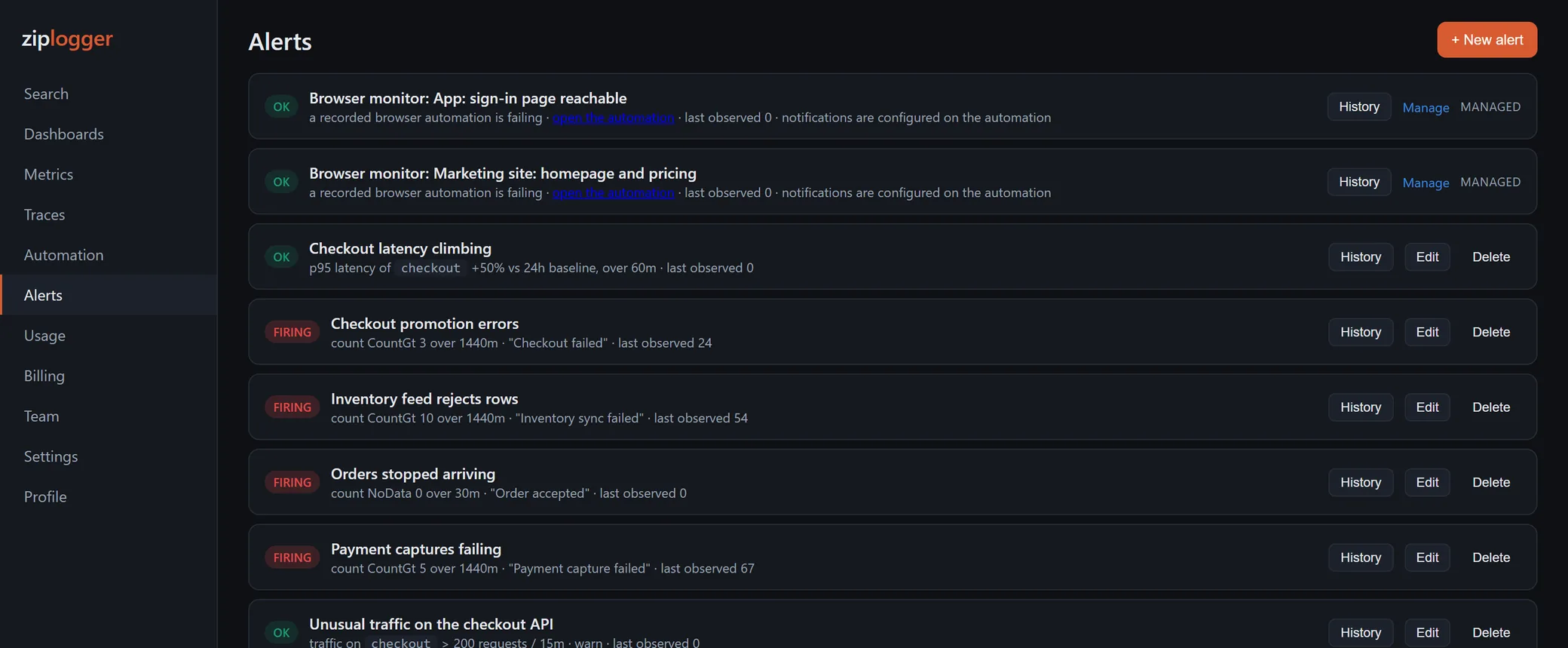
When a rule goes from OK to FIRING, ZipLogger opens one incident and notifies your channels once. While the rule stays FIRING, nothing more is sent. When it goes back to OK, the incident resolves on its own and your channels get a recovery message. History on the rule lists every firing, with a link to its incident.
The incident's severity comes from the rule. For log rules it follows the Severity filter: fatal becomes critical, error high, warn medium, info and debug low, and any medium. No data rules open high-severity incidents, and service down rules critical ones.
Two cases where an incident opens but nobody is paged:
- A maintenance window is running that covers the rule or its service. The incident is recorded and marked suppressed. Set these up under Alerts → Delivery → Maintenance windows before a planned deploy or migration.
- The workspace is opening a flood of incidents in the same minute. Paging pauses, so one broken dependency does not send a hundred pages.
If someone resolves the incident by hand while the problem is still there, the rule stays FIRING and does not open a new incident. It fires again only after it has recovered first.
Keeping rules quiet until they matter
The rules have no "must be true for N minutes" setting. Each check compares the count in the window to the threshold, and that is the whole decision. So the window is your main tool against noise:
- A longer window smooths out short bursts. With a 1-minute window, ten errors in one second fire the rule, and a minute later it recovers. With 15 minutes the same burst is diluted.
- A count that hovers near the threshold will flap, firing and recovering on alternate checks. Move the threshold away from the normal level, or lengthen the window.
- Exclude what you already know about. Adding
AND NOT "connection reset by peer"keeps a known, harmless error out of the count. - Use one rule per real problem. A rule on all errors everywhere tells the person paged nothing. A rule on
source:checkout-apitells them where to look. - Page people only for rules that need a person. Send lower-severity rules to a webhook or email, and put the escalation policy only on the ones that justify waking someone.
Trace-based rules have built-in guards: a latency rule needs at least 5 spans in the window and 20 in the baseline before it can fire.
What rules do not do
- No repeat reminders. A rule notifies once when it fires. If nobody acts, nothing is sent again unless an escalation policy has later steps.
- No rules on request metrics. The latency condition reads traces, not data sent to
/ingest/v1/metrics. - No math across queries. There is no "errors divided by requests" rule. Each rule counts one thing.
To set one up, create a free workspace, send some logs, and go to Alerts → Rules → + New alert. The alerts section of the docs has the reference.