Blog Product analytics and replay
Move off Mixpanel without rewriting tracking
You have mixpanel.track() calls all over a codebase and you want those events somewhere else. Rewriting every call site is the part nobody wants to do. ZipLogger accepts Mixpanel-shaped requests, so for the common calls the change is a host setting and a key. This post shows the exact settings, what carries over, and what does not.
The three routes
ZipLogger has three routes that read Mixpanel's request format:
| Mixpanel endpoint | ZipLogger route | What happens |
|---|---|---|
/track | /ingest/v1/mp/track | Events. Name and custom properties are kept. |
/import | /ingest/v1/mp/import | Same pipeline as track, meant for backfills. |
/engage | /ingest/v1/mp/engage | $set and $set_once are stored as a $profile_set event. See the gaps below. |
Each route accepts a JSON object, a JSON array, or Mixpanel's data= field with base64 JSON in a form body or query string, which is what the Mixpanel libraries send.
For authentication, ZipLogger reads an X-Api-Key header or, if there is none, the token property inside the event. An unmodified Mixpanel SDK puts your project token there. So the switch is: create an ingest key under Settings → API keys, and pass it where you passed the Mixpanel project token. After that, these routes go through the same pipeline as native events: the same plan quota, the same redaction of credential-looking values, the same workspace isolation.
Browser: mixpanel-browser
Before:
import mixpanel from 'mixpanel-browser'

mixpanel.init('YOUR_PROJECT_TOKEN')
After:
import mixpanel from 'mixpanel-browser'

// YOUR_API_KEY is a ZipLogger ingest key, not a Mixpanel project token
mixpanel.init('YOUR_API_KEY', {
  api_host: 'https://app.ziplogger.ai/ingest/v1/mp',
})

// The call sites stay as they are
mixpanel.track('Checkout Started', { total: 49, currency: 'USD' })
mixpanel.identify('user_42')
mixpanel.track('Order Placed', { total: 49 })
api_host must include the /ingest/v1/mp path. mixpanel-browser appends its own route to it, so track calls end up at /ingest/v1/mp/track/.
Here is how the Mixpanel fields map:
distinct_idof the form$device:...becomes the anonymous id. Any otherdistinct_idbecomes the user id.$device_idand$user_id(Mixpanel's simplified ID merge) become the anonymous id and the user id.- The
$identifyevent thatmixpanel.identify()sends becomes an identity link, so the visitor's events from before sign-in join the same user. timecan be epoch seconds or milliseconds.$insert_idbecomes the event's id, so a retried batch overwrites instead of counting twice.$current_urlbecomes the event URL, with the query string removed.token,ip,mp_liband$lib_versionare dropped. Everything else, including mixpanel-browser's own$browserand$os, is kept as a custom property under the name you sent.
Two changes you will notice in the Events page. Event names are normalized, so Checkout Started is stored as checkout_started. And an event keeps at most 60 properties and strings are cut at 1,000 characters.
Server: the Mixpanel Node library
The Node library takes a host and a path, and builds each request as path plus route:
const Mixpanel = require('mixpanel')

const mixpanel = Mixpanel.init('YOUR_API_KEY', {
  host: 'app.ziplogger.ai',
  path: '/ingest/v1/mp',
})

mixpanel.track('Invoice Paid', { distinct_id: 'user_42', amount: 120 })
Location is looked up from the address that sent the request, and the ip property is ignored. Events sent from your server therefore get your server's location, not the user's.
Three gaps you will hit today
The track routes store the events, but they do not answer the way Mixpanel's libraries expect, and profile updates do not get through at all. Know this before you rely on callbacks, console output or people.set().
- Response format. ZipLogger answers with HTTP 202 and its own JSON (
accepted,rejectedand quota counts), not Mixpanel's1or{"status": 1}. The Node library passes a "Mixpanel Server Error" to your callback even when the event was stored. The Python library (mixpanel) reads thestatusfield and raises an error on every call, so do not point it at ZipLogger yet. From Python, use ZipLogger's HTTP API or its own SDK. - Browser console. mixpanel-browser sends its requests with credentials, and ZipLogger's ingest routes allow any origin but not credentials. The request still reaches ZipLogger and the events are stored, but the browser blocks the SDK from reading the response and logs a CORS error for each request.
- Profile updates from the SDKs. ZipLogger looks for the key in
properties.token, which is where track events carry it. Mixpanel's libraries send profile updates with the key in a top-level$tokenfield instead, somixpanel.people.set()from an unmodified SDK gets a 401 and is lost. A request to/ingest/v1/mp/engagethat you build yourself with anX-Api-Keyheader works.
So check that events arrived in the app, not through the SDK's own success signals.
What does not carry over
- Groups. There is no
/groupsroute, soset_groupand group profiles do nothing. - Other profile operations.
/engagereads only$setand$set_once.people.increment,append,union,unsetandremoveare ignored, and a request that contains only those gets a 400. $set_oncesemantics. It is stored the same way as$set. Nothing checks whether the value was already set.- A profile store. ZipLogger builds user profiles from the event stream. There is no profile document to overwrite in place.
alias(). The$create_aliasevent is stored as an ordinary event. It does not link ids. Useidentify().- Old history. Timestamps more than 30 days in the past are replaced with the arrival time, and imported events count against your plan's event quota. Backfill the window you actually query.
- Anything else Mixpanel serves. Session recording, feature flags, and the query and export APIs have no ZipLogger routes.
- Events with no identity. An event with no
distinct_id,$device_idor$user_idis rejected. - Sessions and traces. Events that come in through these routes carry no ZipLogger session id or request id. They will not show on a session replay timeline or link to a trace.
Or switch to the native calls
The Mixpanel routes are there so you can move without touching call sites. Once you are over, the native SDK is a small change per call and it fixes the last point on that list.
| Mixpanel | ZipLogger browser SDK |
|---|---|
mixpanel.init(token, { api_host }) | new ZipLoggerBrowser({ endpoint, apiKey }) |
mixpanel.track(name, props) | ziplogger.track(name, props) |
mixpanel.identify(id) | ziplogger.identify(id) |
mixpanel.people.set(props) | No profile store. ziplogger.identify(id, props) keeps the properties on the identify event |
mixpanel.reset() | ziplogger.reset() |
import { ZipLoggerBrowser } from '@ziplogger/browser'

export const ziplogger = new ZipLoggerBrowser({
  endpoint: 'https://app.ziplogger.ai',
  apiKey: 'YOUR_API_KEY',
})

ziplogger.instrumentFetch()   // links each event to the request it happened in

ziplogger.track('checkout_started', { total: 49, currency: 'USD' })
ziplogger.identify('user_42', { plan: 'team' })   // after sign-in
ziplogger.reset()                                 // on sign-out
What you get over the Mixpanel route: every event carries a session id, so it shows on that session's replay timeline. The anonymous id is kept in localStorage (zl_anon) and linked by identify(). Every event carries an insertId, so a retry cannot count it twice. With instrumentFetch() on, an event tracked right after a request carries that request's trace id, and the event page shows that request's logs and traces.
On a .NET backend, ZipLogger.Extensions.Logging registers an IEventTracker next to the logger. The Serilog post covers logging setup; for events it looks like this:
using ZipLogger.Client;

builder.Logging.AddZipLogger(options =>
{
    options.Endpoint = "https://app.ziplogger.ai";
    options.ApiKey   = "YOUR_API_KEY";
});

var app = builder.Build();

app.MapPost("/invoices/{id}/pay", (string id, IEventTracker analytics) =>
{
    analytics.Track("invoice_paid", new { userId = "user_42", invoiceId = id, amount = 120 });
    return Results.Ok();
});
Track never blocks and never throws. userId, anonymousId and sessionId in the object are lifted into the event's identity fields, and the rest become properties. To link a pre-login id to an account, call analytics.Identify(userId, anonymousId).
Check that it arrived
Open Events in the app. The list shows each event with its user, session, location and device, and you can search by event name and user id. Explore is where you filter on your own properties, such as the total you were already sending to Mixpanel.
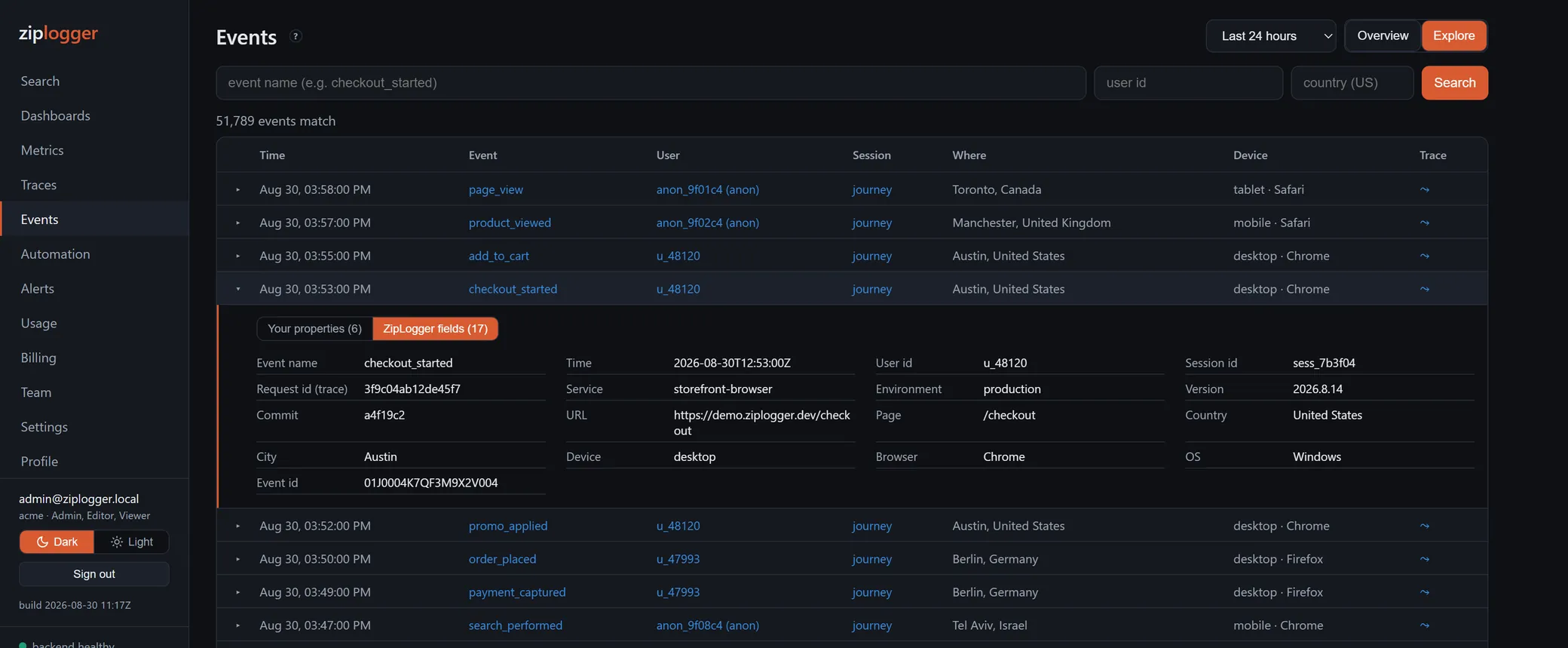
If nothing shows up, the status code of the request tells you why. 401 means the key is wrong or revoked. 429 means the plan's event quota is used up, and the response carries Retry-After. 400 with "No events in payload" means nothing in the request could be read as an event.
Next step
The Mixpanel alternative page compares the two products honestly, including when to stay on Mixpanel. For what you can do with the events once they land, see product analytics.