Centralized Go logging with slog and ZipLogger
Go services usually log to stdout and leave collection to whatever runs them. That works until you need every failed reservation for one SKU across all your pods. The ZipLogger Go SDK is a log/slog handler that sends your slog calls to one searchable place. It uses the standard library only.
Install
go get github.com/ziploggerhq/ZipLogger_Client/sdk_goIt needs Go 1.21 or newer, the first version with log/slog.
A note on versions, because the module moved. Today that command gets v0.4.0, the latest tag and the first one published under the ziploggerhq path. The older v0.3.3 declares the previous github.com/ahaliav/ZipLogger_Client/sdk_go path. If you have that in your go.mod, change the import path when you move to v0.4.0; Go will not accept v0.4.0 under the old name. The code on main has only comment changes since v0.4.0.
The package name is ziplogger, while the path ends in sdk_go. An import alias makes that obvious to readers:
import ziplogger "github.com/ziploggerhq/ZipLogger_Client/sdk_go"For an API key, go to Settings → API keys in the app and click Create key. The key starts with zk_ and is shown once.
Set up the handler
package main

import (
	"errors"
	"fmt"
	"log/slog"
	"os"
	"time"

	ziplogger "github.com/ziploggerhq/ZipLogger_Client/sdk_go"
)

var ErrOutOfStock = errors.New("out of stock")

func main() {
	client, err := ziplogger.New(ziplogger.Options{
		Endpoint: "https://app.ziplogger.ai",
		APIKey:   os.Getenv("ZIPLOGGER_API_KEY"), // YOUR_API_KEY
		Source:   "inventory-api",
	})
	if err != nil {
		panic(err)
	}
	defer client.Close(5 * time.Second)

	logger := slog.New(ziplogger.NewSlogHandler(client, slog.LevelInfo))
	slog.SetDefault(logger)

	reqLog := logger.With("requestId", "req_7Hq2").WithGroup("http")
	reqLog.Info("reserved stock", "method", "POST", "status", 200)

	err = fmt.Errorf("reserve SKU-1042: %w", ErrOutOfStock)
	slog.Error("reservation failed", "err", err, "sku", "SKU-1042")
}
New returns an error only when Endpoint or APIKey is empty. It does not check the key against the server.
We ran this against a local HTTP catcher, with GIT_COMMIT and ZIPLOGGER_RELEASE set. These are the two lines it received (host name changed):
{
  "commitSha": "4f2a9c1",
  "fields": {
    "environment": "production",
    "http.method": "POST",
    "http.status": 200,
    "machineName": "web-01",
    "requestId": "req_7Hq2"
  },
  "message": "reserved stock",
  "release": "1.8.0",
  "severity": "info",
  "source": "inventory-api",
  "timestamp": "2026-09-29T14:26:05.9230663+03:00"
}
{
  "commitSha": "4f2a9c1",
  "fields": {
    "environment": "production",
    "exceptionMessage": "reserve SKU-1042: out of stock",
    "exceptionType": "*fmt.wrapError",
    "machineName": "web-01",
    "sku": "SKU-1042"
  },
  "message": "reservation failed",
  "release": "1.8.0",
  "severity": "error",
  "source": "inventory-api",
  "stackTrace": "reserve SKU-1042: out of stock",
  "timestamp": "2026-09-29T14:26:06.0174223+03:00"
}
Because of slog.SetDefault, calls to the old log package go through the handler too. A log.Printf("legacy line %d", 7) arrived as an info line with the message legacy line 7.
How attributes become fields
- Each key-value pair and each
With(...)attribute becomes a field. WithGroup("http")prefixes the keys that follow with a dot:http.method,http.status.- Levels map to
debug,info,warnanderror.slog.LevelError+4and above is sent asfatal. Lines below the level you pass toNewSlogHandlerare skipped. - An attribute named
errorerrorthat holds anerrorfills the exception fields. Under any other key, an error arrives as an empty object."cause", errsends{}.
A few things we found by running it, which you should know before you rely on them:
slog.Group(...)values are not expanded. Aslog.Group("warehouse", slog.String("id", "eu-1"))attribute arrived as[{"Key":"id","Value":{}}]. UseWithGroupor flat keys like"warehouse.id".LogValueris not called. If you hide fields with aLogValue()method, the handler ignores it and sends the struct as JSON. Ausertype whoseLogValuereturned only the id arrived with itsEmailfield too. Pass the id yourself ("userId", u.ID) until this changes.- A
time.Durationis sent as nanoseconds: 250ms arrives as250000000. - The
context.Contextpassed toInfoContextand friends is not read. Trace ids are not added for you.
Errors do not carry a stack
A Go error has no stack trace, so stackTrace holds the error text and exceptionType is the Go type (*fmt.wrapError, *errors.errorString). You can still search on both.
ZipLogger matches new errors to the commit that likely caused them by reading file and line numbers from the stack trace. A line with only error text gives it nothing to read. If you want frames on important errors, use the client directly and attach the current goroutine's stack:
client.Log(ziplogger.Entry{
	Severity:   "error",
	Message:    "reservation failed",
	Err:        err,
	StackTrace: string(debug.Stack()), // import "runtime/debug"
	Fields:     map[string]any{"sku": "SKU-1042"},
})
That is the stack where you log, not where the error was created, but it has main.go:24-style lines the matcher can use. More in finding the commit that broke production.
Close, and when it does not run
Log puts the line on a buffered channel and returns. A goroutine sends batches in the background. Close(timeout) stops accepting lines, sends what is buffered, and waits up to timeout for that to finish.
defer client.Close(...) in main covers a normal return. It does not cover os.Exit, log.Fatal (which calls os.Exit) or a signal that kills the process. For a server, stop on SIGTERM and let main return:
ctx, stop := signal.NotifyContext(context.Background(), os.Interrupt, syscall.SIGTERM)
defer stop()
// start your server, then:
<-ctx.Done()
server.Shutdown(context.Background())
// main returns, the deferred client.Close runs
Delivery
Lognever blocks and never panics. The channel holds 10,000 lines (QueueCapacity). When it is full, new lines are dropped and counted inclient.Dropped().- Batches of up to 100 lines (
BatchSize) are sent as NDJSON to/ingest/v1/logswith anX-Api-Keyheader. A partial batch waits at most 2 seconds (FlushInterval). - Network errors, 408, 429 and 5xx are retried up to 5 times (
MaxRetries), starting at 500ms and capped at 30 seconds.Retry-Afteris respected. Other errors, like 401 for a wrong key, drop the batch and count it. - When your plan's ingest volume is used up, the API answers 429, and after the retries the batch is dropped. See the pricing page.
- A retry resends the whole batch without an
Idempotency-Key, so a request that timed out after it was stored can show up twice. HTTPClientlets you pass your own*http.Client, for a proxy for example. There is no disk buffer.
What the SDK adds to every line: source (the Source option, ZIPLOGGER_SOURCE, then the executable name), release (ZIPLOGGER_RELEASE), commitSha (ZIPLOGGER_COMMIT_SHA, GIT_COMMIT or COMMIT_SHA), fields.environment (ZIPLOGGER_ENVIRONMENT, default production) and fields.machineName. Go has no package version to read, so set the release yourself, for example with -ldflags into a variable you pass as Release.
This is a field on each line. Which ZipLogger environment the line is stored in is decided by the API key, not by this value. See Separate staging and production logs.
Finding the lines
In Search, the box searches the message unless you name a field:
fields.sku:SKU-1042 AND severity:error
fields.http.status:500
source:inventory-api AND "reservation failed"
The Patterns view groups lines by message shape. slog messages are usually fixed strings with the values in attributes, which groups well. In our demo workspace the Go service's Inventory synced line is one row:
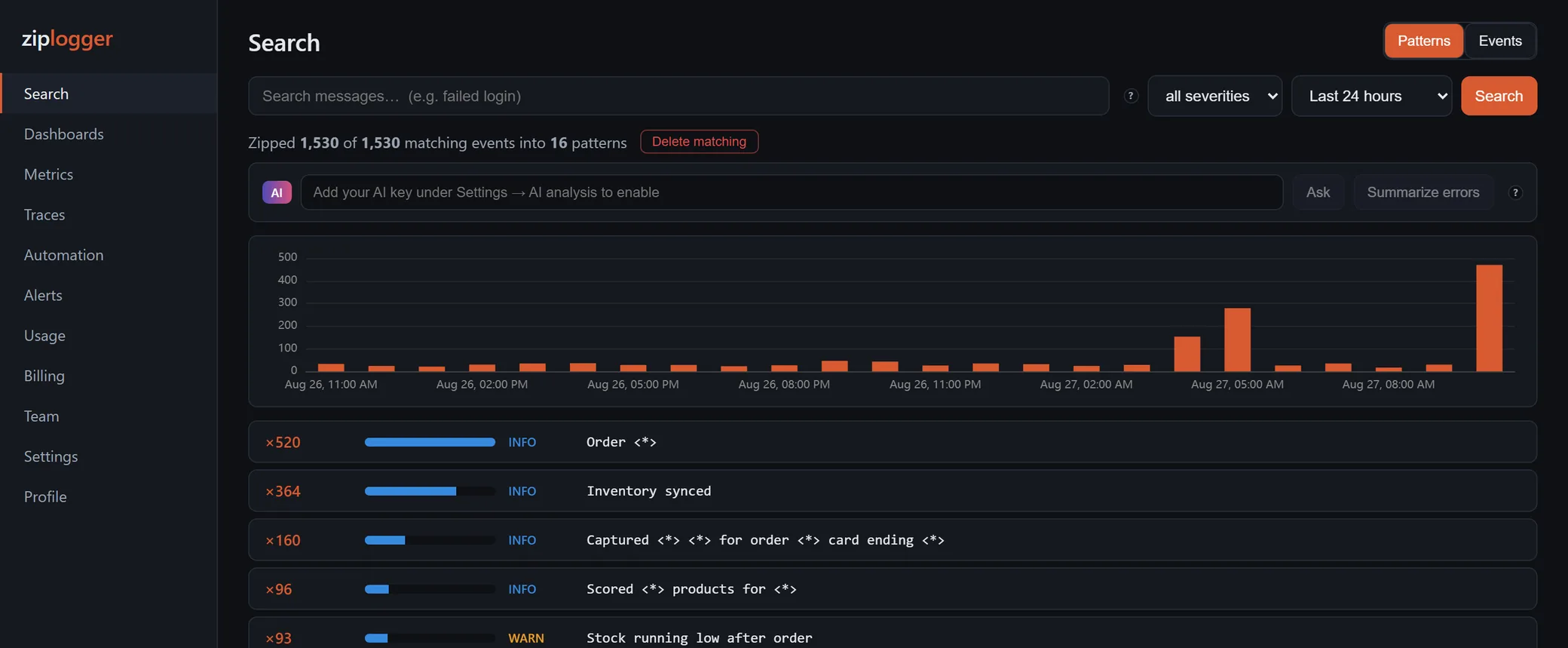
The Go SDK does not send a declared message template, so these groups are built from a sample at read time. See log pattern clustering.
What it does not do
It sends logs only: no events API and no tracing. For traces, use OpenTelemetry and send them over OTLP. If you add the trace id as a string attribute named traceId, the log detail shows a View trace link.
The setup is also in the Go docs. To send your first lines, create an account and make a key under Settings → API keys. Running Node too? See the Node.js guide.