Centralized Python logging with ZipLogger
Most Python services log to stdout or to a file on each machine. That is fine until you need every error for one customer across three workers. The ziplogger package adds one handler to the standard logging module, so the log.info(...) calls you already have go to one searchable place.
There is no new logging API to learn, and the package has no dependencies. It uses the standard library only.
Install and connect
pip install ziploggerIt needs Python 3.9 or newer. You also need an API key: in the app, go to Settings → API keys and click Create key. The key starts with zk_ and is shown once.
import logging
import os

from ziplogger import ZipLoggerHandler

logging.basicConfig(level=logging.INFO)
logging.getLogger().addHandler(ZipLoggerHandler(
    endpoint="https://app.ziplogger.ai",
    api_key=os.environ["ZIPLOGGER_API_KEY"],   # YOUR_API_KEY
    source="orders-api",
))

log = logging.getLogger("app.orders")
log.info("Order %s created", 83112)
A few notes on those lines:
- The handler does not read the key from the environment by itself. The sample reads
ZIPLOGGER_API_KEYwithos.environso the key stays out of your code. basicConfig(level=logging.INFO)matters. The root logger drops anything below WARNING by default, so without it yourinfocalls never reach the handler.- Set
source. It is the service name you filter on later. If you leave it out, it falls back to theZIPLOGGER_SOURCEenvironment variable, then the name of the script that started the process. Under gunicorn or uvicorn that is the server's name, not your app's.
Add context with extra=
A log line is only easy to find if the values you search for are fields, not words in a sentence. Pass them with extra=:
log.info(
    "Order %s created",
    order_id,
    extra={"orderId": order_id, "userId": user_id, "itemCount": len(items)},
)
This is what the handler sends for that line:
{
  "timestamp": "2026-09-29T10:50:08.435705+00:00",
  "severity": "info",
  "message": "Order 83112 created",
  "source": "orders-api",
  "fields": {
    "category": "app.orders",
    "orderId": 83112,
    "userId": "u_42",
    "itemCount": 3,
    "environment": "production",
    "machineName": "web-01"
  }
}
The rules, straight from the handler code:
- Every
extrakey becomes a field. The logger name becomescategory. - Strings, ints, floats, booleans and
Noneare sent as they are. Anything else is sent asstr(value). A dict like{"items": 3}arrives as the text{'items': 3}, not as nested fields. Flatten it yourself if you want to filter on the parts. - Keys that start with
_are skipped. - You cannot use names that
LogRecordalready has, such asmessage,nameormodule. Python itself raises aKeyErrorfor those. environmentcomes from theenvironmentargument,ZIPLOGGER_ENVIRONMENTorENVIRONMENT, and defaults toproduction.machineNameis the host name.
This is a field on each line. Which ZipLogger environment the line is stored in is decided by the API key, not by this value. See Separate staging and production logs.
The same context on every line
Passing userId to every call gets old. A logging.Filter on the handler can add it for you. With a contextvars variable, this works for threads and for asyncio:
import contextvars
import logging

current_user = contextvars.ContextVar("current_user", default=None)

class AddUser(logging.Filter):
    def filter(self, record):
        record.userId = current_user.get()
        return True

handler.addFilter(AddUser())   # handler is your ZipLoggerHandler

# in your request middleware:
current_user.set(request.user.id)
Anything you set on the record in a filter is sent as a field, the same as extra.
Exceptions and tracebacks
Use log.exception(...) inside an except block, or pass exc_info=True:
try:
    charge(order)
except PaymentError:
    log.exception("Payment failed for order %s", order_id, extra={"orderId": order_id})
The full traceback goes into the stackTrace field. The exception class name goes into exceptionType (for example ZeroDivisionError, without the module) and its message into exceptionMessage. The level is error.
log.error("Payment failed: %s", e) without exc_info sends no traceback, only the text. The traceback is what lets ZipLogger match a new error to the commit that likely caused it, so it is worth the habit. See finding the commit that broke production.
Django, Flask and dictConfig
The handler works with logging.config.dictConfig, which is what Django's LOGGING setting uses. Keys other than class, level, formatter and filters are passed to the constructor:
# settings.py
import os

LOGGING = {
    "version": 1,
    "disable_existing_loggers": False,
    "handlers": {
        "console": {"class": "logging.StreamHandler"},
        "ziplogger": {
            "class": "ziplogger.ZipLoggerHandler",
            "endpoint": "https://app.ziplogger.ai",
            "api_key": os.environ["ZIPLOGGER_API_KEY"],
            "source": "shop-web",
            "level": "INFO",
        },
    },
    "root": {"handlers": ["console", "ziplogger"], "level": "INFO"},
}
In Flask, FastAPI or a plain script, pass the same dict to logging.config.dictConfig(LOGGING) once at startup.
Finding the logs
In Search, the query box searches the message unless you name a field. Your extra values are under fields.:
fields.orderId:83112
fields.userId:u_42 AND severity:error
source:orders-api AND "Payment failed"
Field names are case-sensitive, so fields.orderId and fields.OrderId are different fields. Click a line to see its JSON fields and Stack trace. The ⊕ and ⊘ buttons next to each value keep only matching lines or leave them out.
The Patterns view groups similar lines together. This is our demo workspace. The Scored <*> products for <*> row is the Python demo service's Scored %d products for %s line, grouped into one row:
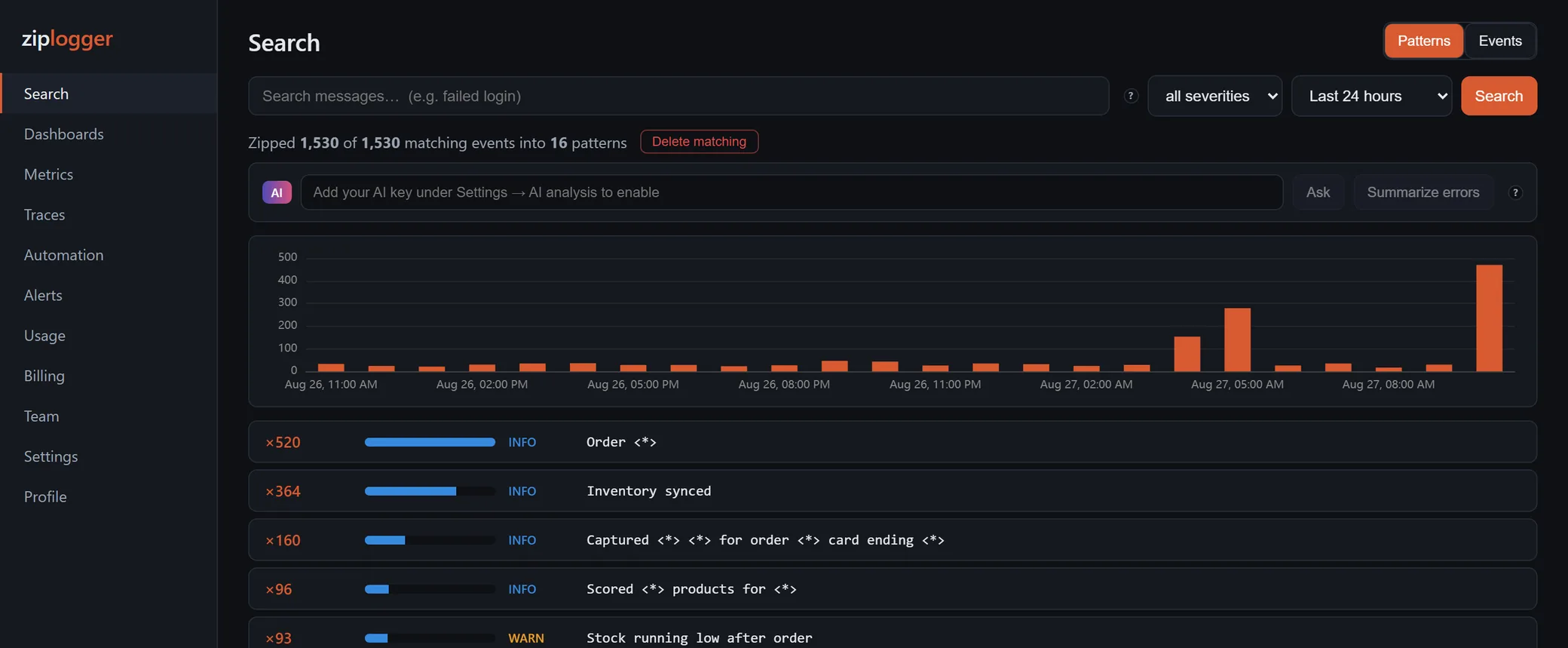
The .NET SDKs send the message template with each line, so their lines are grouped exactly. The Python handler does not, so Python lines are clustered from a bounded sample, and the counts are within that sample. You can declare the template yourself with a filter:
class DeclareTemplate(logging.Filter):
    def filter(self, record):
        if isinstance(record.msg, str):
            record.messageTemplate = record.msg
        return True

handler.addFilter(DeclareTemplate())
This works because with %-style arguments, record.msg is the same string ("Order %s created") for every order. It does not help with f-strings: log.info(f"Order {order_id} created") is a different string each time, which is one more reason to use %s and arguments. More on this in log pattern clustering.
Delivery, and what is not supported
- A logging call never blocks and never raises. Records go into an in-memory queue (
queue_size, default 10,000). When it is full, records are dropped and counted inhandler.dropped. - A background thread sends batches of up to 100 records (
batch_size). A batch waits at most 2 seconds (flush_interval) from its first record. - Timeouts, network errors,
429and 5xx responses are retried up to 5 times (max_retries) with backoff, andRetry-Afteris respected. Other errors, such as401for a wrong key, drop the batch right away. logging.shutdown()runs when the interpreter exits normally and flushes the queue, waiting up to 5 seconds. If the process is killed, whatever is still in memory is lost. There is no disk buffer.- The thread starts when the handler is created. Create the handler in the process that logs. With
gunicorn --preload, a handler created in the master process has no running thread in the forked workers, so their logs are never sent. - Release and commit are not detected from your package. Pass
release=andcommit_sha=, or setZIPLOGGER_RELEASEandZIPLOGGER_COMMIT_SHA(GIT_COMMITandCOMMIT_SHAalso work). - Trace ids are not added for you. If you put a
traceIdfield on a line yourself, the log detail links to that trace. For tracing, see sending traces over OTLP. - The Python package is logs only. It has no product-analytics events API yet; the .NET and browser SDKs do.
The setup is also in the Python docs. To send your first lines, create an account and make a key under Settings → API keys.