Blog Product analytics and replay
Session replay without recording passwords
Session replay is useful right up to the moment it records a customer's card number. After that it is a liability. This post covers what ZipLogger's browser SDK records, what it masks before anything leaves the page, and how to mark up the parts of your app that should never be recorded at all.
It records the DOM, not the screen
A replay is not a video. The SDK uses rrweb (the @rrweb/record package) to take a snapshot of the page's DOM, then records every change to it: nodes added and removed, text changes, scrolling, clicks, mouse movement. The ZipLogger player rebuilds the page from that stream.
Two things follow from this. Text in a replay is real text, so masking has to change the text itself, not blur pixels. And masking can happen in the browser, while the page is being serialised, so the original values never make it into the upload.
Some details from the recorder settings in the SDK:
- Script elements, HTML comments and head metadata are not serialised.
- Mouse movement and scrolling are sampled. For a form field, only its final value is kept, not each keystroke.
- A fresh full snapshot is taken every ten minutes, so seeking in a long session stays cheap.
- Events go up in gzip chunks to
/ingest/v1/replay, about every five seconds and whenever the tab is hidden or closed.
Setup
npm install @ziplogger/browser @rrweb/recordimport { ZipLoggerBrowser } from '@ziplogger/browser'
import { attachSessionReplay } from '@ziplogger/browser/replay'
export const ziplogger = new ZipLoggerBrowser({
endpoint: 'https://app.ziplogger.ai',
apiKey: 'YOUR_API_KEY', // an ingest key used only for browser traffic
sessionReplay: {
enabled: true,
sampleRate: 0.1, // record 10% of sessions
maskInputs: true, // the default, written out so nobody turns it off by accident
},
})
ziplogger.captureGlobalErrors() // uncaught errors and unhandled promise rejections
attachSessionReplay(ziplogger) // starts on its own because enabled is true@rrweb/record is an optional peer dependency. The SDK loads it with a dynamic import() only when a session is sampled in, so visitors who are not recorded never download it.
Before it records anything, the SDK calls GET /ingest/v1/replay/config. If replay is off for your workspace, not in your plan, or switched off platform-wide, the recorder never starts. To see what happened in a given tab, check ziplogger.sessionReplay.isRecording() and ziplogger.sessionReplay.lastReason in the console. The reason is a short code such as not_sampled or disabled.
What is masked before upload
With the default settings:
- Every value typed into an input or textarea is replaced with asterisks of the same length. The replay shows that someone typed 16 characters into the card field. It never shows the digits.
- Password, one-time code and payment fields are also on a fixed list the SDK always adds to its text-masking rules:
input[type="password"], plus inputs whoseautocompleteiscurrent-password,new-password,one-time-code,cc-number,cc-csc,cc-exp,cc-exp-month,cc-exp-yearorcc-name. What visitors type into them is covered by the input masking above. - Anything inside an element with
data-ziplogger-maskhas its text replaced with asterisks. - Anything inside an element with
data-ziplogger-ignoreis not recorded. The replay shows an empty box of the same size.
Leave
maskInputson. WithmaskInputs: false, the recorder masks field values by input type. That coverstype="password", but not a card number typed into a plain text field that is only marked withautocomplete="cc-number". If you really need it off, record a test session of your sign-in and checkout pages and look at the replay before you ship.
A workspace admin can also enforce masking for every app that sends to the workspace. Under Settings → Data → Session replay there are two checkboxes: "Mask everything typed into inputs and textareas" and "Mask all text on the page". The SDK takes the stricter answer. If either your code or the workspace asks for masking, the page is masked. Nothing in your code can loosen what the workspace has set.
Masking and blocking your own elements
Most apps show personal data outside of form fields: a name in the header, an address on an order page, a support chat. Mark those up:
<!-- Recorded as asterisks: the layout stays, the name and email do not -->
<div class="account-header" data-ziplogger-mask>
  Signed in as Jane Doe, [email protected]
</div>

<!-- Not recorded at all: the replay shows an empty box of the same size -->
<section id="support-chat" data-ziplogger-ignore>
  ...
</section>
If you cannot change the markup, for example because the element comes from a third-party component, pass CSS selectors instead:
sessionReplay: {
  enabled: true,
  maskSelector: '.customer-name, .address-block',  // text masked, on top of [data-ziplogger-mask]
  blockSelector: '#support-chat, .bank-details',   // not recorded, on top of [data-ziplogger-ignore]
},
For pages that print personal data everywhere, such as an internal admin tool or a CRM screen, set maskAllText: true. Every text node is masked, and the replay shows only layout, clicks and scrolling.
URLs are the part people miss
Masking works on text and input values. It does not touch attributes, and a URL is an attribute. If your paths contain an email address or a customer id, like /users/[email protected]/orders, that path ends up in the recording through the page address and through every link on the page, no matter how much text you mask.
The SDK strips the query string from the page URL it sends with each chunk. But rrweb's own page-load event still records the full address, query string included, and links on the page keep whatever is in their href. If identifiers or tokens can appear in your URLs, add a scrubUrl function. It rewrites the page address and every href, src, srcset, action and similar attribute in the recording:
sessionReplay: {
  enabled: true,
  scrubUrl: (url) => url
    .replace(/\/users\/[^/?#]+/g, '/users/:id')  // hide ids and emails in paths
    .replace(/\?[^\s#]*/g, ''),                 // drop query strings
},
It is off by default because it walks every recorded event, which costs time on every page. If your function throws, the SDK drops that value instead of passing it through.
What is never captured
Going by the SDK code and the recorder settings:
- Cookies,
localStorage,sessionStorageand request headers. The recorder reads the DOM, and none of these are in it. - Canvas contents (
recordCanvasis off by default) and the contents of video and audio elements. - Cross-origin iframes. The browser does not allow it, so the frame shows as an empty box.
- Scripts.
Images are recorded as URLs, not copied. They load from your server when someone watches the replay, so an image behind an expired signed URL shows as broken.
Put together, a replay contains your page's layout and text minus what you masked, what the visitor clicked and scrolled, how many characters they typed into each field, and the address of each page. Whether that fits your privacy policy is your call. The lists above are what you need to make it.
Sampling, and pages you should not record at all
sampleRate is the share of sessions to record, from 0 to 1. The decision is made once per session from a hash of the session id and kept in sessionStorage under zl_replay, so a visitor is recorded on every page of a visit or on none of them. An admin can override the rate for the whole workspace in the same settings card, under "Record this share of sessions". The "0%" option keeps the feature on and records nothing.
A recording also stops on its own after one hour (maxSessionSeconds, default 3600) or about 50 MB of recorded data (maxSessionBytes).
Some pages are not worth recording even with masking. The simplest guarantee is to never attach replay on them. ZipLogger's own marketing site does this for its sign-up, sign-in and password reset pages:
const credentialPage = /signup|signin|forgot-password|reset-password/.test(location.pathname)

if (!credentialPage) {
  attachSessionReplay(ziplogger)
}
Not attaching is safer than attaching and calling ziplogger.sessionReplay.stop() right after, because the stop can lose the race with the recorder starting.
A replay is linked to the session's errors and events
The recorder uses the same session id that track() puts on every event, kept per tab in sessionStorage as zl_sess. While a session is being recorded, the SDK also adds that sessionId to every log line it sends. That includes errors from captureGlobalErrors() and captureError(), and failed requests logged by instrumentFetch().
That is what the replay page uses. Under the player there are markers for Error, Failed request, Warning and Event, taken from the logs and events that carry the session id. Click one and the player jumps to that moment. The player also has ±10 s buttons, speeds from 0.5× to 8×, and a "Skip idle time" checkbox. Going the other way, a session's journey page shows a "Watch the replay" link when a recording exists.
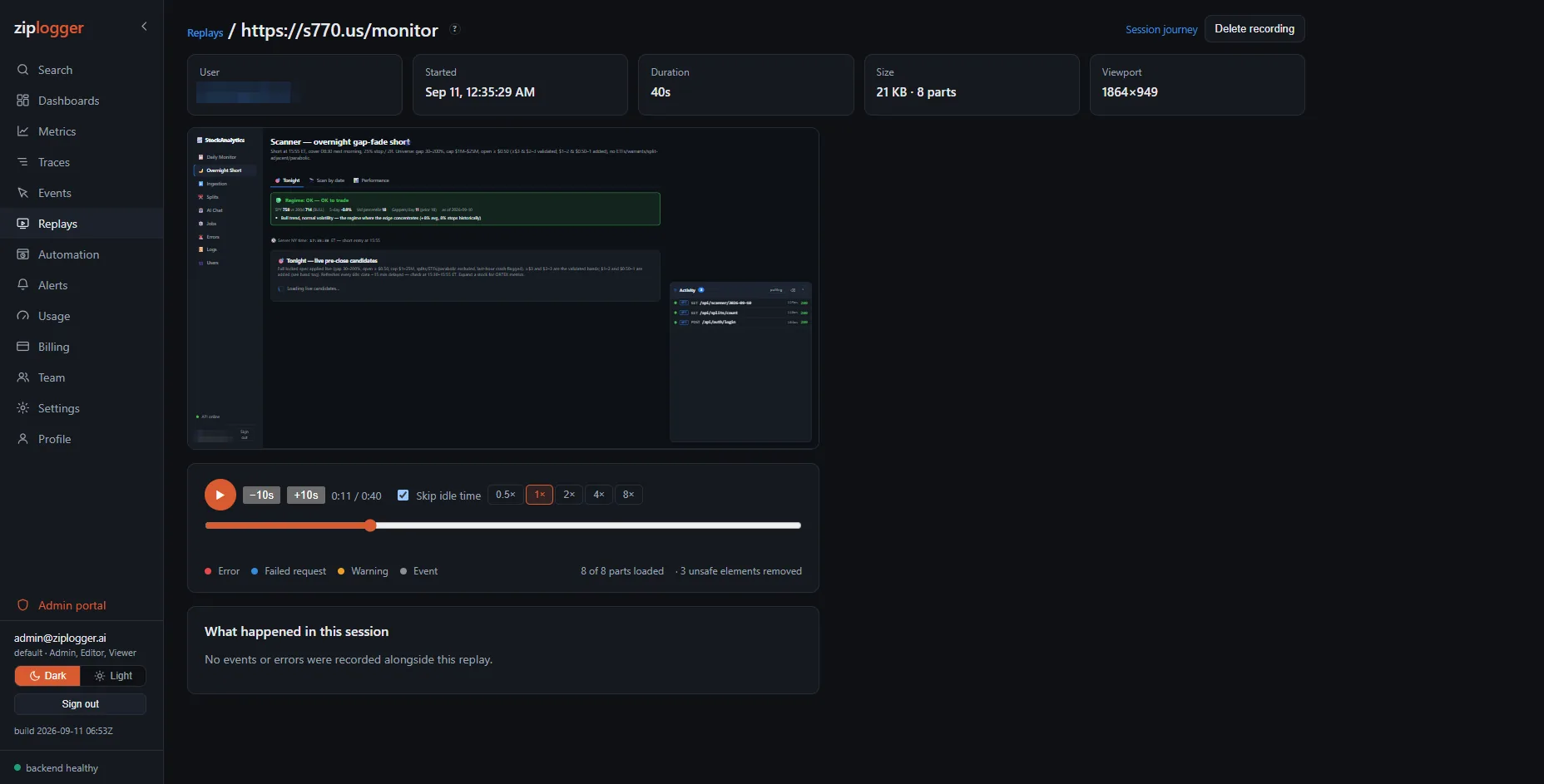
On sign-out, call ziplogger.reset(). It starts a new anonymous id and a new session id, and the current recording ends with the old session.
Retention and deletion
Recordings are kept for 30 days by default, on a retention window separate from your logs and traces. An admin can pick between 3 and 90 days under "Keep recordings for", and can delete a single recording from its page with "Delete recording". Deleting removes the stored chunks, not just the list entry.
Next step
The session replay docs have the setup and the settings in one place. Replay only shows you what real visitors did after the fact. If you want to catch a broken sign-in page before anyone hits it, read synthetic browser monitoring.